 By 管理员

I use VSCode myself, and Copilot replies normally in my Windows projects, but in projects inside WSL it hits network errors. It turned out the Copilot plugin in WSL couldn’t reach the proxy, so I fixed that, and along the way I also sorted out proxy access for the WSL terminal.
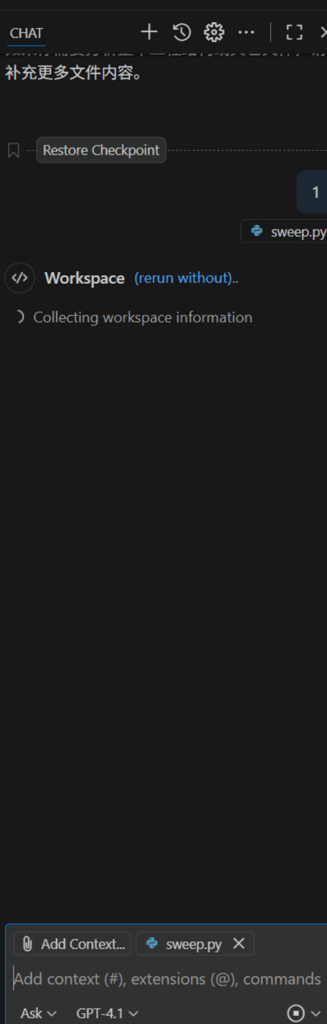
Since I use v2rayn myself, I tried that first, but it didn’t fix Copilot in WSL, so I dropped that route.
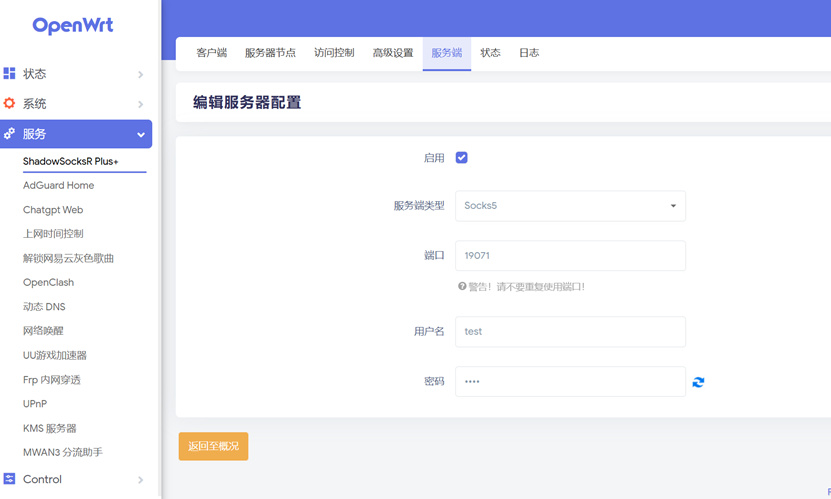
So next I went with a self-hosted socks5 server. My LAN already has an OpenWrt bypass router that all the local devices use, so I did the proxy server setup on that bypass router. Open the OpenWrt admin page, go to Services, and pick the server option of the ss plugin. Configure a socks5 server there, set the port, the username and the password, and enable it.
Then open the WSL terminal and edit the ~/.bashrc file. Add the following to the end of the file (remember to change it to your own bypass router IP, socks5 server port and password), then run sync.
export http_proxy="socks5h://Socks5:密码@192.168.3.22: 19071"

export https_proxy="socks5h://Socks5:密码@192.168.3.22: 19071"

export all_proxy="socks5h://Socks5:密码@192.168.3.22: 19071"
Run this in the WSL terminal
curl ip.sbIf you haven’t set up a socks5 server, you’ll see the following result

Once the server is configured, running it shows the IP address. I also curled google to test it, and that went through too. From here our WSL terminal can use the proxy through the socks5 server just fine.

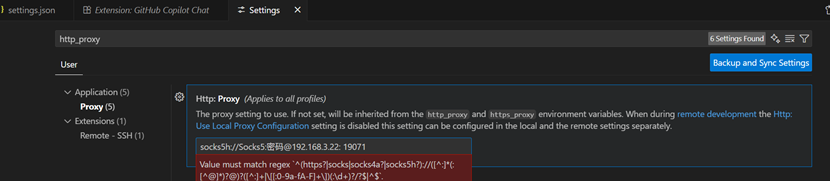
Next, search http_proxy in the VSCode settings, add the matching socks5 config, restart, and Copilot in WSL works normally again.
References
https://zhuanlan.zhihu.com/p/414627975
https://blog.csdn.net/Asssshzy/article/details/129691504
Published on October 4, 2025.